
Appearance
Connect an OLX Account
Connect an OLX marketplace seller account so your MyChatBot agent can answer buyer questions on your OLX listings — replying to messages about your items automatically, right where shoppers are browsing.
Use this channel if you sell on OLX in Ukraine, Poland, or Romania and want your agent to handle incoming buyer chats. You can connect several OLX accounts under this one channel.
At a glance
| You need | Where | Result |
|---|---|---|
| An agent to connect | Channels → your agent → OLX Accounts | Agent selected for OLX |
| Your OLX country | The country dropdown (olx.ua / olx.pl / olx.ro) | The right OLX site for authorization |
| An account name | The Account Name field | A label for this OLX account |
| To sign in on OLX | OLX's authorization page | Account authorized to MyChatBot |
| The bot switched on | Connect agent to this channel toggle | Agent starts replying to buyers |
Connect in 4 steps:
- Open Channels and select your agent, then open the OLX Accounts channel.
- Pick your country and enter an Account Name.
- Click Connect, then sign in on OLX and authorize access.
- Back in MyChatBot, turn on Connect agent to this channel.
In the app
Everything on this page lives under Channels → your agent → OLX Accounts. App URL: https://app.mychatbot.app/channels
Before you start
- You need a working OLX seller account on one of the supported sites: olx.ua (Ukraine), olx.pl (Poland), or olx.ro (Romania).
- You'll sign in with your normal OLX login during setup — there are no API keys or tokens to copy. Authorization is handled entirely through OLX's own sign-in page.
Set up the OLX channel
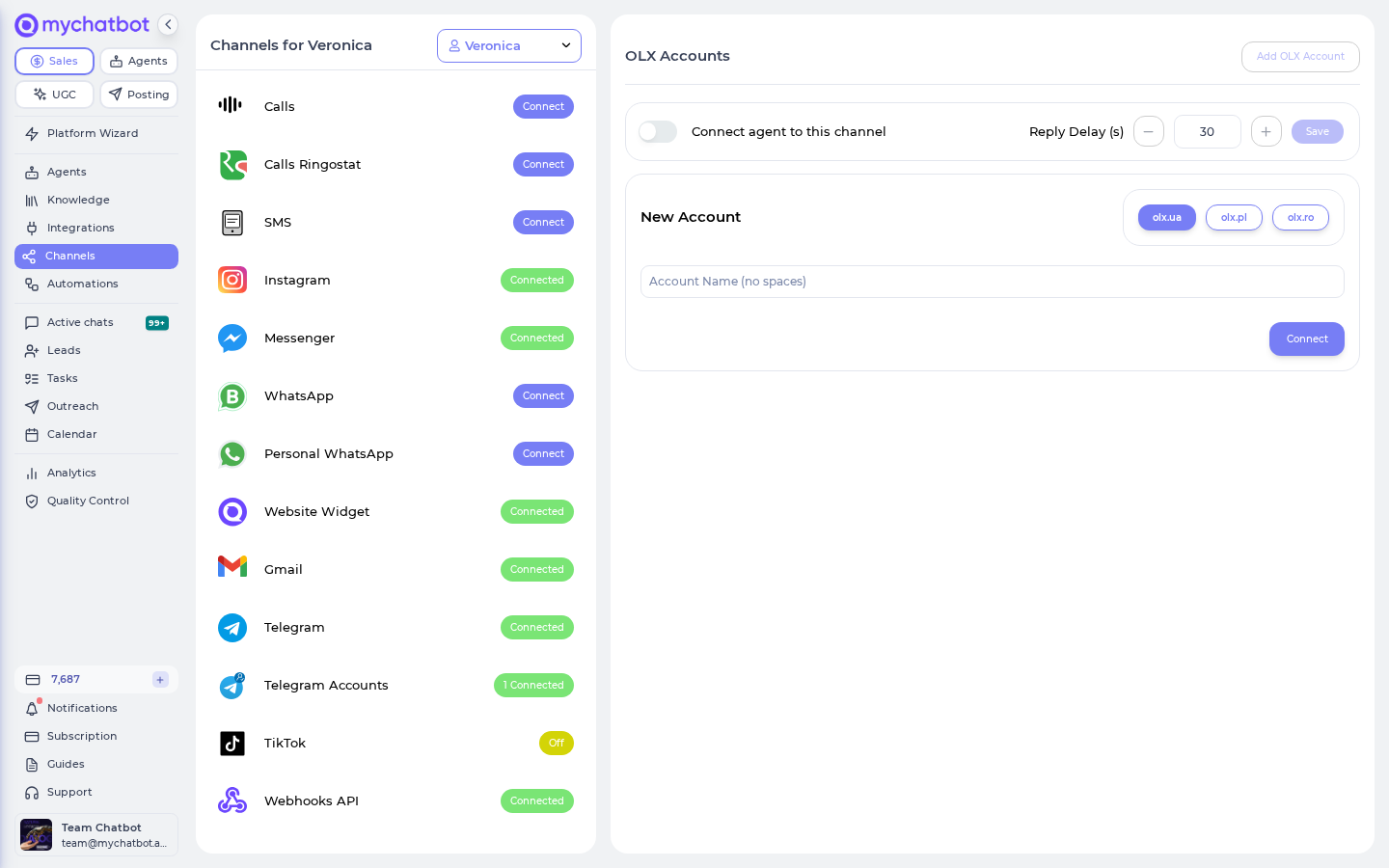
1. Open the channel
- Go to Channels and select the agent you want to connect.
- Open the OLX Accounts channel.
2. Choose the country and name the account
- In the country dropdown, pick the OLX site your account is on: olx.ua, olx.pl, or olx.ro.
- In Account Name, type a label for this account.
Account name rules
The account name can't contain any of these five characters: . , : ( ). Spaces are removed automatically as you type, so you don't need to worry about them. The name must be at least 3 characters long. Each account name must be unique; if you reuse one you'll see "OLX page_id … is already connected."
3. Authorize on OLX
- Click Connect.
- MyChatBot sends you to OLX's authorization page. Sign in with your OLX account and approve access.
- OLX returns you to MyChatBot, and the account is connected.
4. Turn the agent on
Once the account shows as connected, switch on Connect agent to this channel. Your agent now answers new buyer messages on this OLX account.
Reply delay
Use the Reply Delay (s) setting to wait a few seconds after a buyer message before replying. It makes conversations feel more natural and gives buyers a moment to finish a multi-message thought.
Connect more than one OLX account
The OLX Accounts channel supports several accounts at once — handy if you run listings under more than one OLX profile or across more than one country.
- Click Add OLX Account to add another.
- Switch between the Your Account and New Account tabs to manage existing accounts or connect a fresh one.
- Give each account its own name so you can tell them apart.
How new messages arrive
MyChatBot checks your connected OLX accounts for new buyer messages on a short, regular cycle. Because it checks periodically rather than being pinged instantly, there can be a short delay (up to roughly a minute) between a buyer sending a message and your agent picking it up. This is normal for OLX and needs no setup on your side.
Keeping the connection alive
OLX authorizations don't last forever. If your OLX account sits idle for a long stretch (about a month or more) or you revoke access from the OLX side, the connection can expire and your agent will stop receiving messages.
If that happens, reopen the channel and click Reconnect to sign in on OLX again. To disconnect completely, click Revoke channel.
Reconnect if buyers go quiet
If your agent suddenly stops answering an OLX account, the authorization has most likely expired. Open the account and click Reconnect to restore it.
Billing
OLX replies are billed like any other text channel: each agent reply counts as one message at your account's message rate. There's no per-minute or per-listing charge from MyChatBot.
Good to know
- Supported countries only. OLX Accounts works with olx.ua, olx.pl, and olx.ro. Other OLX sites aren't available.
- Slight delay is expected. New buyer messages are picked up on a short polling cycle, so replies aren't instant.
- One name per account. Duplicate account names are rejected — pick a unique, character-safe name for each.