
Appearance
Connect SMS
Connect a text-messaging number so your MyChatBot agent can hold two-way SMS conversations with customers — no app to install on their side, just a phone number they text like any contact.
SMS is a good fit when your customers prefer plain text messages, when you want to reach people who don't use chat apps, or when you already run a business number through Twilio or OpenPhone and want your agent to answer it. You bring the number and provider account; MyChatBot handles the replies.
At a glance
| You need | Where | Result |
|---|---|---|
| An agent to connect | Channels → your agent → SMS | Agent selected for SMS |
| A provider account | Twilio or Quo (OpenPhone) | A number that can send and receive SMS |
| Provider credentials | The Connect SMS form | Channel verified and saved |
| The bot switched on | Connect agent to this channel toggle | Agent starts replying |
Connect in 4 steps:
- Open Channels and select your agent.
- Open the SMS channel and choose your Provider — Twilio or Quo (OpenPhone).
- Enter your provider credentials and phone number, then click Connect SMS.
- Turn on Connect agent to this channel.
In the app
Everything on this page lives under Channels → your agent → SMS. App URL: https://app.mychatbot.app/channels
Which provider?
MyChatBot connects your number through one of two SMS providers. Pick the one you already use — you'll need an active account there with an SMS-capable number.
| Provider | What it is | Best for |
|---|---|---|
| Twilio | The Twilio telephony platform | Businesses already on Twilio, or who want to buy/port a number there |
| Quo (OpenPhone) | OpenPhone's business phone service | Teams already using an OpenPhone number |
Enter your phone number in international E.164 format (for example, +1 212 555 0123).
Set up the SMS channel
- Go to Channels and select the agent you want to connect.
- Open the SMS channel.
- Under Provider, choose Twilio or Quo (OpenPhone).
- Fill in the fields for your provider (below), then click Connect SMS.
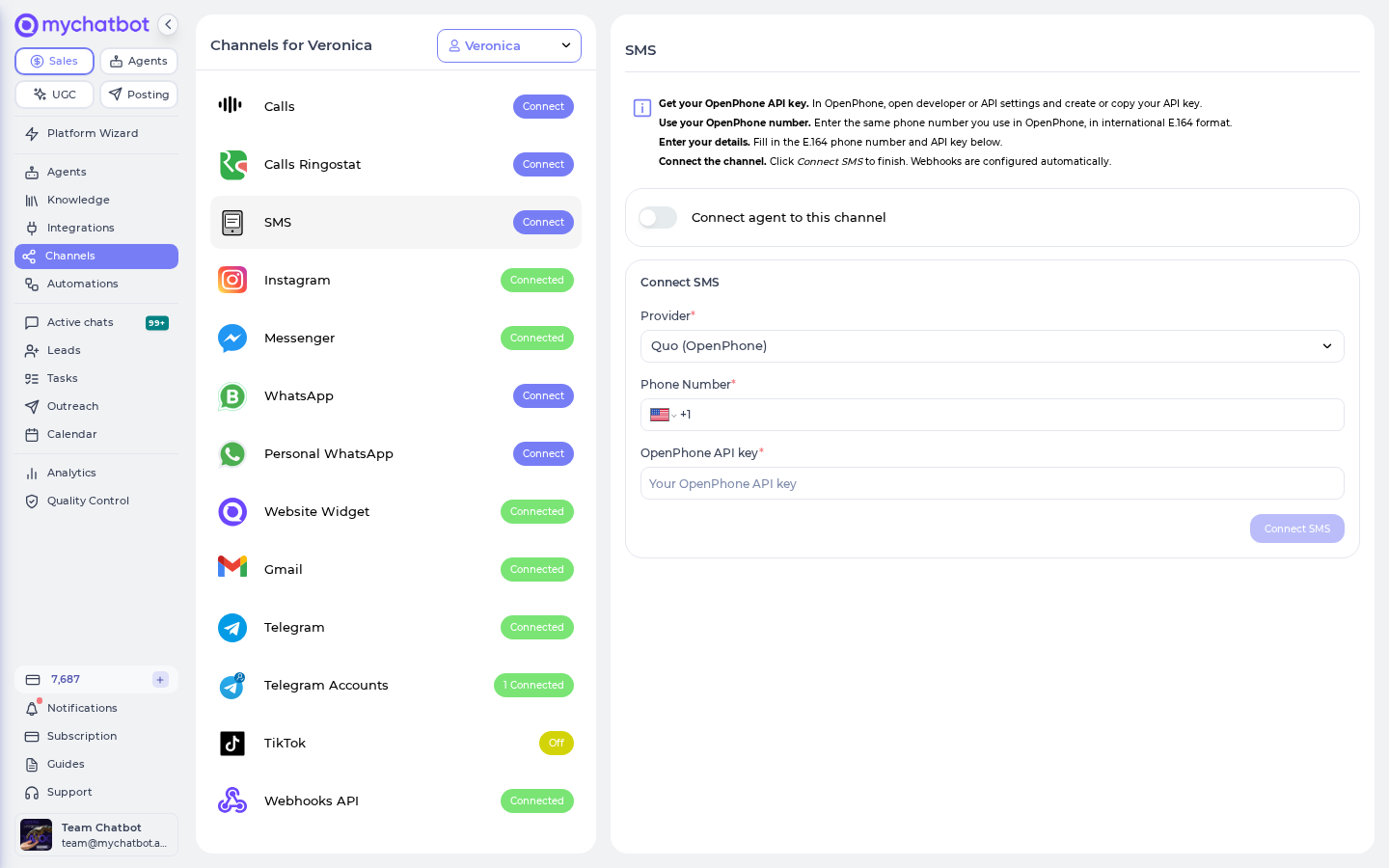
If you chose Twilio
- Sign in to twilio.com and open the console.
- Copy your Account SID and Auth Token.
- Make sure you have a Twilio phone number that supports SMS (buy or port one if needed).
- In MyChatBot, fill in:
- Phone Number — your Twilio number, e.g.
+1 212 555 0123 - Twilio Account SID
- Twilio Auth Token
- Phone Number — your Twilio number, e.g.
- Click Connect SMS.
Reuse credentials from Calls
If you already connected a phone number through the Calls channel on Twilio, the SMS form shows a Use Twilio credentials from Calls channel option. Tick it to reuse the same Account SID and Auth Token instead of re-entering them.
If you chose Quo (OpenPhone)
- In OpenPhone, open your developer or API settings and copy your OpenPhone API key.
- Note the OpenPhone number you'll use, in international E.164 format.
- In MyChatBot, fill in:
- Phone Number — your OpenPhone number
- OpenPhone API key
- Click Connect SMS.
When the channel connects, the panel switches to Connection Details, showing the connected Phone Number and Provider. The button changes to Revoke SMS.
Go live
Once the channel is connected, turn on Connect agent to this channel. Your agent now answers incoming texts to that number. Switch the toggle off to pause without disconnecting, or click Revoke SMS to remove the channel entirely.
One number, one channel
Each phone number can be connected only once across MyChatBot. If the number is already in use on another agent or account, the connection is rejected — free it up or use a different number.
Twilio: point the number's Messaging webhook to MyChatBot
For Quo (OpenPhone), MyChatBot configures the webhook for you automatically. For Twilio, incoming messages are matched by the destination number, but if your Twilio number's Messaging webhook isn't already pointed at MyChatBot's SMS endpoint, inbound texts may not arrive. In the Twilio console, set the number's incoming-message webhook to:
https://api.mychatbot.app/webhook/sms
Billing
SMS replies are billed like every other text channel: one agent reply counts as one message at your account's per-message rate. See usage and billing for details.
Carrier fees are separate
Your SMS provider (Twilio or OpenPhone) bills you directly for the carrier cost of sending and receiving each text. Those charges are outside MyChatBot and appear on your provider invoice.