
Appearance
Usage & billing
Agents spend real money — plain dollars, not abstract points. Two things fund that spend: the monthly allowance included with your plan, and your credit balance (money you add plus any credits we grant). The Usage page (app.mychatbot.app/agents/usage) is where you see it all — how much you can spend, how much you've used this cycle, and where the money went, per agent.
This page explains, in order:
- The two buckets your spend draws from, and the order they're drawn in.
- How to read the Balance card — every number on it, and why the stats below it use a different time window.
- When agents stop — the two different reasons, and the fix for each.
- Adding credits and the billing cycle.
- What consumes your balance (tools and media).
- A short FAQ for the questions we hear most.
The two buckets your spend draws from
Your agents draw from two separate buckets, in a fixed order:
| Bucket | What it is | Resets? | Carries over? |
|---|---|---|---|
| 1. Plan allowance | The dollar amount included with your monthly plan (e.g. $49/cycle). | Yes — refills to full at the start of each billing cycle. | No — unused allowance is use-it-or-lose-it; it does not roll into next cycle. |
| 2. Credit balance | Money you add yourself with "+ Add credits" (top-ups), plus any credits we grant you (comps). | No. | Yes — credits are non-expiring and pooled across all your agents. |
Spend is drawn allowance first, then credits. Each cycle, agents spend your plan allowance until it's used up, and only then start drawing from your credit balance. This is why a cycle can spend far more than your plan price — once the allowance runs out, credits keep the agents running.
Spending only stops when both buckets are empty — the full plan allowance for the cycle and your credit balance. At that point the card's "available" figure reads $0.00 and runs can't spend until you top up or the cycle resets.
Your plan price is not a spending cap
A "$49 plan" does not mean "$49 is the most I can spend this month." $49 is the allowance included in the plan. Once it's used up, spend continues out of your credit balance — so a cycle can total $168, $500, or more, all the way until your credits also hit $0. If you want a hard ceiling, simply don't keep a large credit balance on the account.
A worked example
Say your plan includes a $49/cycle allowance and you've topped up $200 in credits. Over one billing cycle your agents do a lot of work:
| As you spend… | The Balance card shows | What's happening |
|---|---|---|
| First $49 | This cycle: $49 of your $49 plan allowance used · available $200.00 | Draining the plan allowance. Credits untouched. |
| Next $120 | This cycle: $169 used — $49 plan allowance + $120 from credits · available $80.00 | Allowance is gone; now drawing credits. $80 of credit left. |
| Another $80 | This cycle: $249 used — $49 plan allowance + $200 from credits · available $0.00 | Both buckets empty. Agents stop. |
Total spent this cycle: $249 — five times the plan price — and every dollar of it is accounted for as $49 allowance + $200 credits. The agents kept running the whole time because there was still money in a bucket. They stopped the moment available hit $0.00. To keep going, you'd add credits — or wait for the cycle to reset, which refills the $49 allowance.
How to read the Balance card
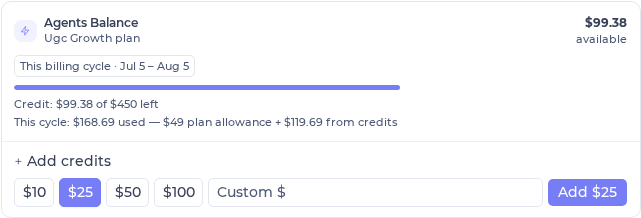
The Balance card sits at the top of the Usage page. Everything on it is about your current billing cycle — the date pill says so. Here's every line:
| On the card | What it means |
|---|---|
$X.XX available | What you can spend right now — your remaining allowance plus your credit balance. When this reaches $0.00, agents stop. (If your plan has lapsed it reads available now and shows $0.00 — see When agents stop.) |
| This billing cycle · Jul 1 – Jul 31 | The time scope of this card. Every other number here is measured over these dates, and resets when the cycle rolls over. |
Credit: $X of $Y left | Your credit balance. $X is what's left to spend now; $Y is the total you've ever added (top-ups + comps), for reference. $Y is a lifetime figure — it does not reset each cycle, and you should not subtract "used this cycle" from it (see the FAQ). |
This cycle: $X of your $A plan allowance used | Shown while you're still inside the allowance. You've used $X of the $A included in your plan, and haven't touched credits yet. |
This cycle: $X used — $A plan allowance + $B from credits | Shown once you've passed the allowance. You've used the full $A allowance and $B of your credits so far this cycle. $X = $A + $B. |
| + Add credits | Top up your credit balance — see Adding credits. |
The card is one billing cycle; the stats below it are a rolling window
The Balance card measures your current billing cycle. The stats section underneath (totals and the by-agent table) measures a rolling "last N days" window you pick with the tabs. They cover different time periods on purpose, so their numbers won't match — that's expected, not a bug. More in the FAQ.
The stats below the card are a different time window
Under the Balance card, the Usage page shows a second section with its own clock:
- A caption — "Stats below — Last 7 days" — and range tabs: Last day · Last 3 days · Last 7 days · Last 30 days · Last 90 days.
- Totals: Runs, Input tokens, Output tokens, and Cost (USD) — for the window you picked.
- By agent: the same breakdown per agent, so you can see which agent spent what. Click an agent to drill into its individual runs and their dollar cost.
- Top-up history: every credit purchase, with dates and amounts.
This section is a rolling window — "the last 7 days," not "this billing cycle." So the Cost (USD) here and the "used this cycle" figure on the card are measuring different spans of time, and will usually differ. Switch the tabs to change the window; the Balance card above never changes with them.
When agents stop (two different reasons)
There are two reasons agents stop spending, and they have different fixes. The Balance card tells you which one you're in.
| 1. Both buckets empty | 2. Plan inactive (lapsed) | |
|---|---|---|
| What the card shows | available $0.00 (the figure turns red). "This cycle" shows the full allowance + all credits used. | available now $0.00, plus an amber note: "$X in credit — reactivate your plan to use it" and a Reactivate plan button. |
| What it means | You've spent the whole plan allowance and your entire credit balance this cycle. | You still have credit — it's locked, not lost. An inactive plan can't spend, even with money in the balance. |
| How to fix it | Add credits to keep going now, or wait for the cycle to reset (your allowance refills). | Reactivate your plan. Your credit is untouched and becomes spendable again the moment the plan is active. |
"It shows I have credit, but my agents stopped / it told me to pay"
That's reason 2. Your credit isn't gone — an active plan is required to spend it. When the plan lapses, the balance is locked: the card deliberately shows $0.00 available now and your "$X in credit" so you can see the money is still there. Click Reactivate plan, and the credit is spendable again immediately. (Reason 1 is different: there, the money really is used up, and topping up or waiting for the reset is the fix.)
Adding credits
Use "+ Add credits" on the Balance card to top up. Pick a preset ($10 · $25 · $50 · $100) or type a custom amount ($5–$500), and you're taken to checkout.
- Credits are non-expiring — they sit in your balance until spent, however many cycles that takes.
- Credits are pooled across all your agents — there's one balance for the whole account, not a per-agent wallet.
- Credits require an active plan to spend. If the plan lapses, the balance is locked until you reactivate (see When agents stop).
- Every top-up is listed in the Top-up history table on the Usage page.
Top up before scheduled or heavy work
Agents spend from your allowance first, then credits — so a busy day, a nightly schedule, or heavy media generation can burn through both faster than you expect. Keep a buffer of credits ahead of unattended work so nothing pauses mid-run. Scheduled runs that hit an empty balance are skipped with a note, and won't retry until their next scheduled time.
The billing cycle
Your plan renews on a monthly billing cycle, shown as the "This billing cycle · dates" pill on the Balance card. When a new cycle starts:
- Your plan allowance refills to the full amount, and "used this cycle" returns to $0.
- Your credit balance carries over untouched — credits don't reset with the cycle.
- Any unused allowance from the old cycle is gone — the allowance is use-it-or-lose-it and does not stack.
So month to month, the allowance is a fresh budget you either use or lose, while credits are a persistent reserve that only goes down when you spend it (or up when you top up).
What consumes your balance
It isn't only the model's text tokens. A few tools do real outside work, and each one shows up as its own run in Usage with its own dollar cost.
| What | How it's charged |
|---|---|
| Model tokens | The input and output tokens of each reply — the baseline cost of every run. |
| Browser tool | Charged by the active minutes the browser is working, plus the browsing model's own work while it drives the page. |
| Reading a video | Charged as its own run when an agent watches/reads a video. |
| Audio transcription | Charged as its own run when an agent transcribes audio. |
| Routine steps | A routine bills per step — each step draws from your balance like a regular run. |
These show up as runs, not hidden fees
The browser, video reading, and transcription each appear as their own rows in the by-agent breakdown. If an agent's spend looks higher than its chat volume suggests, look for these tool runs.
Media generation (Content Factory) in usage
When an agent generates media — images, video, audio, e.g. through the Content Factory — each media job is a separate line item with its own dollar cost and no token count, attributed to the agent and conversation that made it.
| Media job | How it appears |
|---|---|
| Image / video / audio generation | A media row in the by-agent drill-down, showing the dollar cost with "—" for tokens |
| Voiceover / text-to-speech | Billed the same way — a media line item with a dollar cost and no tokens |
An agent's total spend is therefore its text/token runs + its media jobs. In the drill-down, media rows sit alongside token runs and roll into that agent's total (media, browser, video, and transcription rows show a "—" for tokens because they aren't text work).
A few rows aren't tied to one agent
On the by-agent view you may also see rows that don't drill down — Media & content, Content tools (external), and Other conversations. These bucket spend that isn't attributable to a specific agent. They're shown so every row adds up to your totals, but there's nothing to click into.
Media is far pricier than text — watch those line items
Generating media, especially video, costs much more than a text reply. A single video job can dwarf a day of chatting. When an agent does a lot of generation, watch its media line items and keep the Balance card in view.
Scheduled runs & budget
Scheduled runs are budget-checked before they fire. If your balance is too low to cover one, the run is skipped with a note in the conversation instead of silently failing — so you can see exactly why it didn't run and top up.
Keep a buffer for scheduled work
A schedule that fires into an empty balance just posts a skip note and moves on — it won't retry until its next scheduled time. If you rely on a nightly digest or a recurring sweep, keep enough balance for it. See Tasks & schedules.
FAQ
Why did I use more than my plan amount?
Because your plan price is an allowance, not a cap. Spend draws your monthly allowance first, then your credit balance — so once the allowance is used up, agents keep running on credits and the cycle total climbs past the plan price. It only stops when both the allowance and your credits are exhausted. See The two buckets.
It shows credit but my agents stopped — why?
Almost always because your plan is inactive. Credits require an active plan to spend, so a lapsed plan locks the balance — the card shows $0.00 available now and your "$X in credit" so you know the money is still there. Click Reactivate plan and it's spendable again. (If instead the card shows plain $0.00 available with no "reactivate" note, the balance is genuinely used up — add credits or wait for the cycle reset.) See When agents stop.
The two usage numbers don't add up — why?
Because they're different time windows, and one figure is lifetime. The Balance card is your current billing cycle; the stats table below it is a rolling window (last 7/30/90 days — set by the tabs). And "Credit: $X of $Y left" shows $Y = total credits ever added, which spans all your cycles. So "credits added $350" and "used this cycle $168" don't subtract — most of that $350 was spent in earlier cycles, not this one. Nothing is missing; the numbers simply measure different spans. See How to read the Balance card.
How do I see how much I have left?
The available figure on the Balance card (app.mychatbot.app/agents/usage) is what you can spend right now — remaining allowance plus credits. Under it, "Credit: $X of $Y left" shows how much credit you have, and "This cycle: …" shows how much of your allowance (and any credits) you've used so far this cycle. To keep going when it runs low, use + Add credits.
Do my credits expire, and does anything reset each month?
Credits never expire and carry across cycles. Your plan allowance resets to full at the start of each billing cycle and is use-it-or-lose-it — unused allowance doesn't roll over. See The billing cycle.
Where do I manage or reactivate my plan?
On the subscription page (app.mychatbot.app/agents/subscription) — also reachable from the Reactivate plan button on the Balance card when a plan has lapsed.
See also
- How a run works — what each run does and why it costs what it costs
- Models & reasoning — model choice drives most of your per-run cost
- Tasks & schedules — budget-checked unattended runs
- Routines — how routine steps bill (one draw per step)
- Tools & toggles — which tools do outside work that bills to your balance