
Appearance
Memory
What an agent remembers, and for how long. MyChatBot agents keep two independent layers of memory: short-term conversation state (this thread's message history plus the settings applied to each reply) and long-term memory (durable facts distilled after a conversation, organized by category, and remembered for the account). Use this page to know which layer holds what, what survives a new conversation, what the assistant recalls on its own — and how to review, correct, or delete what it has learned.
Cheat sheet
| Layer | What it holds | Scope | Lifetime | Auto-recalled at reply time? | You control it via |
|---|---|---|---|---|---|
| Conversation history | Every turn's messages, tool calls, and outputs | One conversation | Until archived / trimmed | Yes — the thread's own history is the context the agent sees | Starting / archiving a conversation |
| Conversation list entry | Title, agent, timestamps | Per account | Until archived | n/a (a list label, not context) | Renaming / archiving in the chat list |
| Per-reply settings | The instructions, tools, connectors, and skills applied to this reply | One reply | Rebuilt for every reply | Yes — shapes the agent for that reply | The agent's Settings |
| Long-term memory | Durable facts ("customer prefers X"), organized by category | Per account | Until you delete it, or a newer fact supersedes it | Essentials always; the rest recalled when a task needs it | Review & delete on the Knowledge page |
The one thing to remember: long-term memory isn't just a passive log. The essentials — your corrections, your brand, and the key preferences and facts about your business — stay in the agent's mind on every reply, and everything else is looked up the moment a task needs it. So on a later conversation the assistant can act on a preference or fact you mentioned earlier — without you repeating it. The background review that saves memories is selective, though, so for anything that must always apply, put it in the agent's Instructions.
Where conversation history lives, by channel
| Channel | Shows in the Conversations list? | Keeps full history? |
|---|---|---|
| Web chat | Yes | Yes |
| Telegram | Yes, read-only (marked as Telegram) | Yes |
Telegram conversations are read-only in the app
Messages exchanged with your Telegram bot keep their full history and appear in the agent's Conversations list flagged as Telegram. You can read them there, but you reply from Telegram itself — not from the web chat box.
Conversation state (short-term)
A conversation is one continuous thread with one agent. The agent's working memory for that thread is its history — every prior turn in the conversation is the context the next reply sees. Start a new conversation for a new topic and the agent starts fresh, with none of the earlier thread's context.
Where conversations live in the app
Open an agent at app.mychatbot.app/agents → pick an agent → Conversations, or see every thread across agents at app.mychatbot.app/agents/chats. Use + New chat to start a fresh thread and the archive control on a row to retire one.
Very long conversations lose their oldest turns
To keep a single thread from growing without bound, MyChatBot trims each conversation once it gets long. Very long threads silently drop their earliest messages from the agent's context. For distinct topics or customers, start a new conversation instead of letting one grow forever.
Per-reply settings
Before each reply, the agent is assembled from its current Settings — its instructions, the tools and connectors you've switched on, and its attached skills. This is recomputed for every message; it's not durable memory, it's just "how the agent is configured right now."
Settings changes apply on the next reply
Because the agent is rebuilt for each message, editing its tools, instructions, or connectors takes effect on the next message — you don't need to restart the conversation. Find these under app.mychatbot.app/agents → pick an agent → Settings.
Which model an agent uses
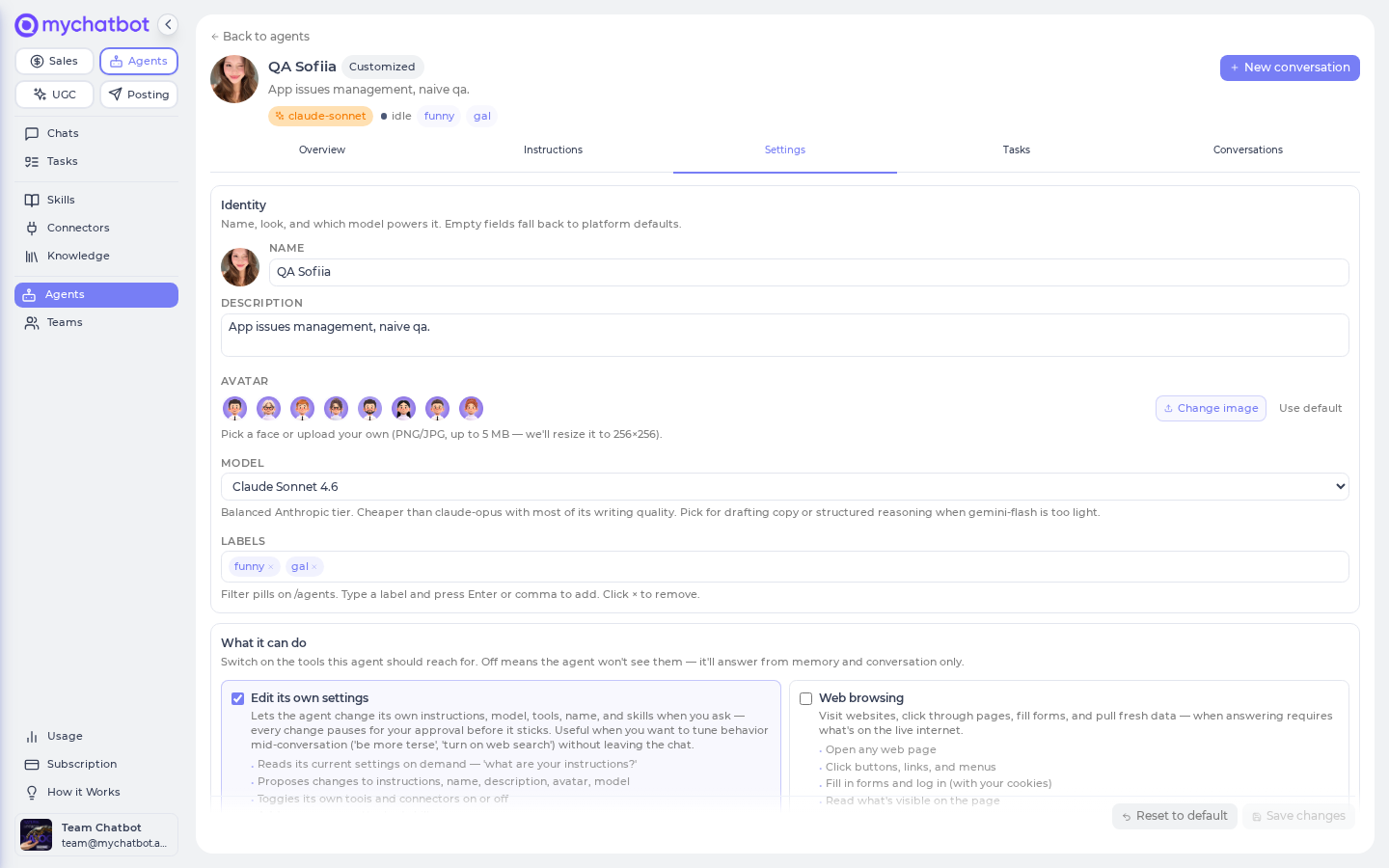
The model is a property of the agent, not of an individual conversation. Set it under Settings → Identity → Model, and every conversation and scheduled task for that agent uses it.
Set an agent's model in the app
app.mychatbot.app/agents → pick an agent → Settings → Identity → Model. Pick a model by its display name (GPT-5, Claude Opus, Gemini, Grok, and more). Leaving it empty falls back to the agent's built-in default.
Two model gotchas
- Reasoning behavior doesn't carry across a model switch. Each model comes with its own built-in reasoning depth. Switching from a deep-reasoning model to a lighter one can quietly turn that extra reasoning off. Pick the model whose reasoning matches the task.
- Built-in agents ship with a default model, not a fixed one. The general-purpose built-in agents come pre-set to a sensible model, and the app may not show a model picker for them. Whatever model an agent uses, you can't move an existing conversation to a different agent mid-thread — that would hand the conversation to a different assistant. Start a new conversation with the agent you want instead.
Long-term memory
After a conversation, MyChatBot quietly reviews it and decides whether anything durable came up — a preference, a standing fact, a decision worth keeping. It picks one of three outcomes:
| Outcome | Meaning |
|---|---|
| Skip | Nothing durable, or already captured |
| Save new | A new durable fact — added to long-term memory |
| Update existing | Refines a fact already remembered — replaces it in place |
Durable facts are kept per account, shared across that account's assistants. This review runs in the background — you never wait on it, and if it fails, your conversation is unaffected.
Long-term memory is deliberately not written for:
- The built-in general assistant (its capabilities are fixed by design).
- Scheduled / automated runs — there's no real user turn to reflect on.
- Replies with no user message (autonomous runs rarely surface anything worth keeping).
- Records that live in another system — bug reports, feature requests, support tickets, CRM entries, order updates. The tracker or CRM is the source of truth; copying its records into memory would only clutter it. Anything of this kind that still slips through is filed as Time-limited and expires on its own.
- Agents whose Learn from conversations switch is off (see below).
Turn learning off for an agent
Some agents shouldn't learn at all — an intake bot that collects bug reports, a triage assistant, anything whose conversations are records for another system rather than facts about your business. For those, open app.mychatbot.app/agents → pick the agent → Settings → Learn from conversations and switch it off.
With the switch off, that agent stops saving auto-learned memories after its runs. Everything else stays as it was:
- The agent still uses the account's existing long-term memory when replying.
- Asking the agent directly to remember something still works.
- Other agents on the account keep learning normally — the switch is per agent.
Organized by category
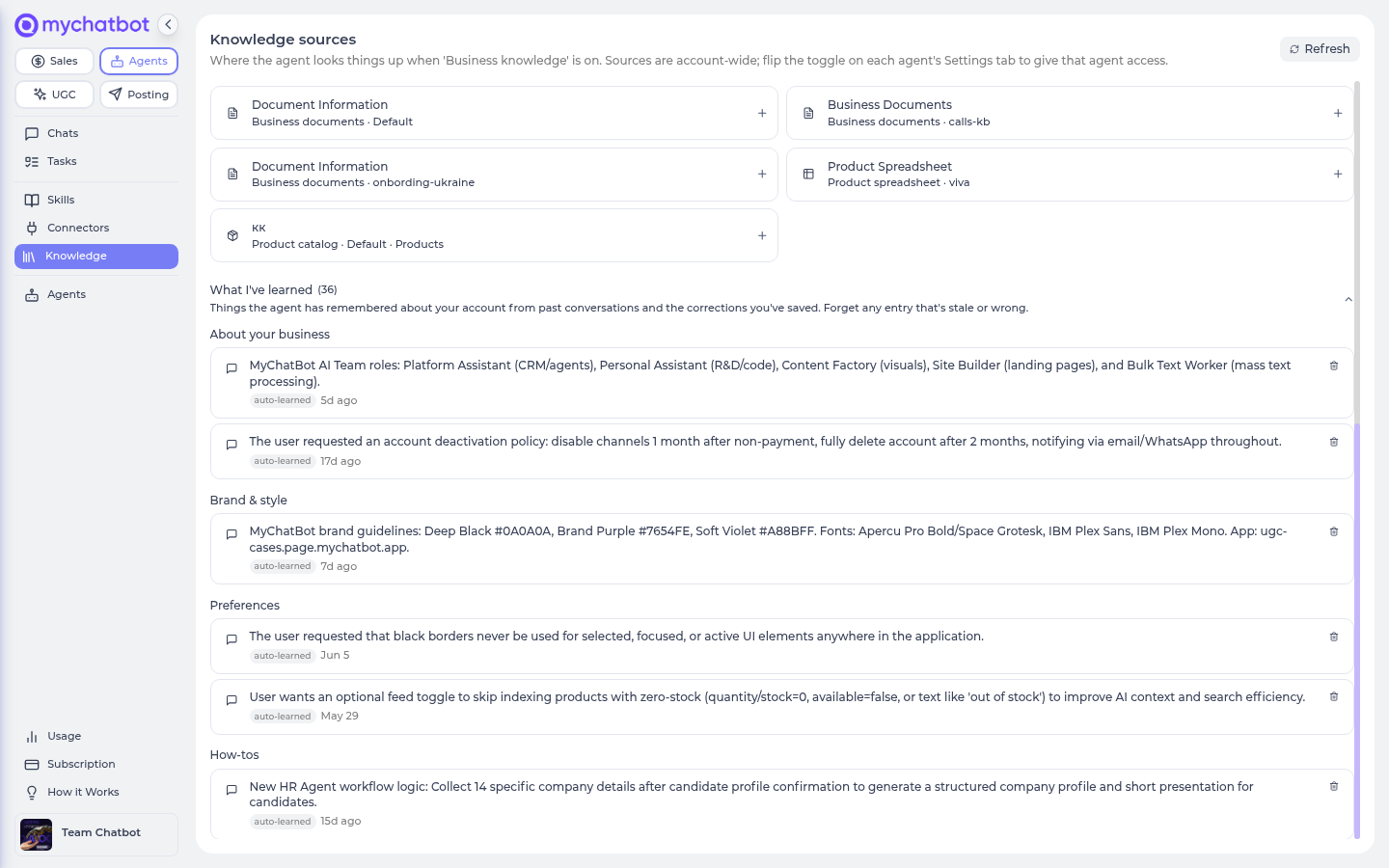
Every saved memory lands in one of eight categories — the same grouping you see when you review them on the Knowledge page:
| Category | What goes there |
|---|---|
| About your business | What you do, what you sell, standing facts about the company |
| Brand & style | Voice, tone, wording, and formatting the agent should stick to |
| Preferences | How you like things done — language, format, level of detail |
| How-tos | Ways of doing a task you've walked the agent through |
| Corrections | Rules you set by correcting a reply — never overridden or lost |
| People & projects | Who's who, and what you're currently working on |
| Know-how | Useful facts and lessons the agent picked up while working for you |
| Time-limited | Things true only for a while — a promo, a deadline, a temporary rule. Expires on the date mentioned in the entry, or after about two weeks when no date is given |
What's always in mind vs. looked up
Agents don't re-read every memory on every reply. Instead:
- The essentials — your corrections, your brand, and your key preferences and facts — are kept in mind on every reply.
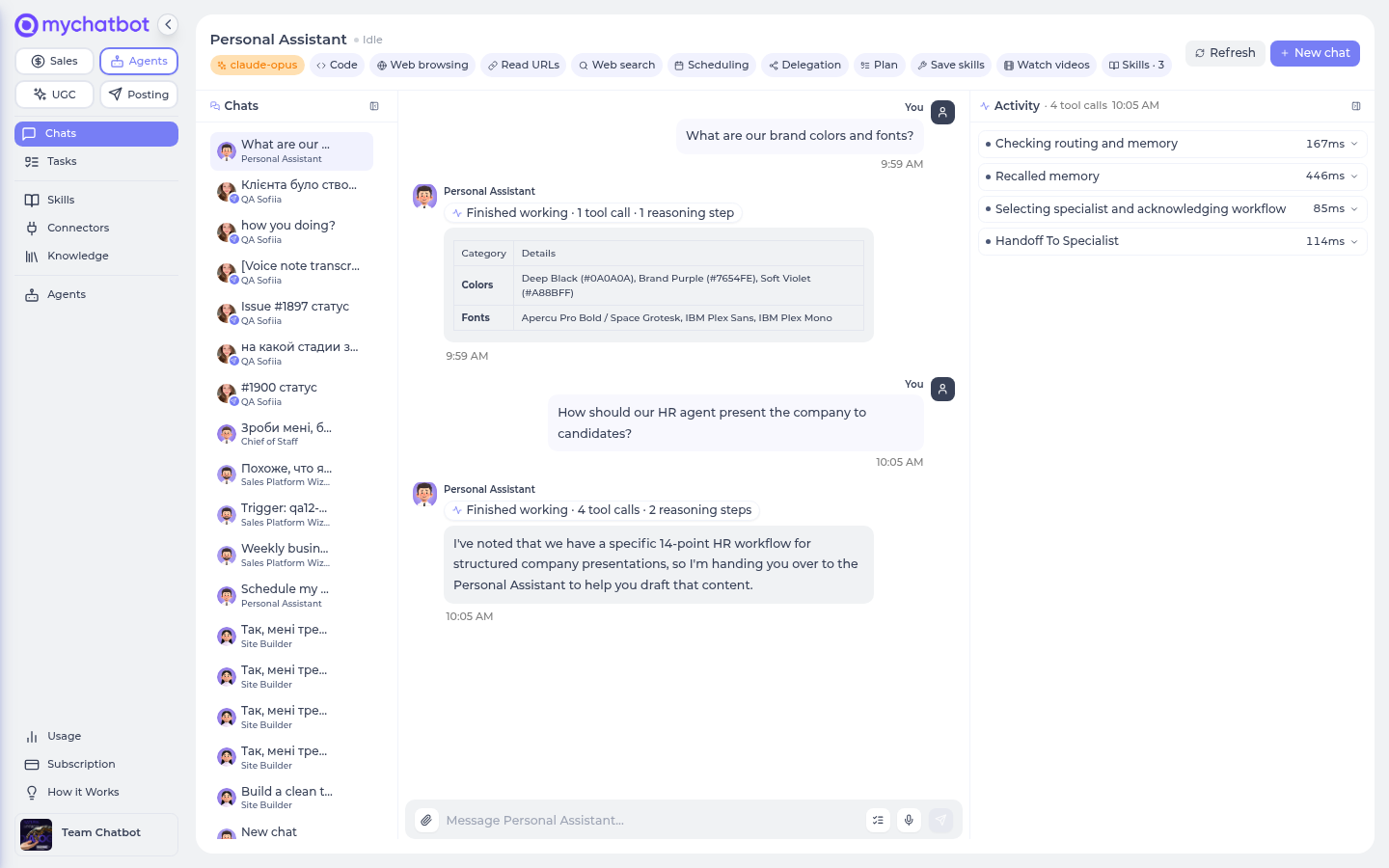
- Everything else is looked up only when a task actually needs it. When that happens, you may see "Recalled memory" appear in the chat.
The payoff: replies stay fast, cheap, and accurate even after your account has built up months of history.
Tidied automatically
About once a day, MyChatBot tidies the memory bank so it stays sharp instead of piling up:
- Duplicates merge — the same fact saved twice becomes one entry.
- Newest wins — when a newer fact contradicts an older one (say, you rebranded), the newest is kept and the outdated one retired.
- Time-limited entries expire — once their date (or the two-week default) passes, they're retired automatically.
- Corrections are never touched — a correction you gave through thumbs-down feedback, plus what the agent should have done, is never merged away or overridden by the tidy-up.
Review and forget
Everything your agents have remembered is listed on the Knowledge page (app.mychatbot.app/agents/knowledge), grouped by the categories above. Review any entry there and delete anything stale or wrong.
Teaching your agent
- Just tell it. State the fact or preference in chat — "we always ship from the Lviv warehouse", "sign emails as Anna". Durable facts are saved automatically after the conversation.
- Correct it through feedback. If a reply is wrong, give it a thumbs-down and write what the agent should have said or done. That becomes a correction — always kept in mind, and never overridden by the daily tidy-up. See Rate & correct replies.
- If it remembers something wrong, you have two fixes: delete the entry on the Knowledge page, or state the right version in chat — the newer fact wins over the old one.
Best practices
Do
- Start a new conversation per topic or customer thread — it keeps history relevant and avoids the trim eating older context.
- Set the model on the agent (Settings → Identity → Model) when a task needs a specific model or reasoning depth.
- Correct wrong replies through feedback (thumbs-down plus what the agent should have done) — corrections are the strongest kind of memory: always in mind, never overridden.
- Skim the Knowledge page now and then — memories are grouped by category, and deleting a stale one takes a click.
- Turn Learn from conversations off (Settings) for intake and triage agents — bots whose conversations are reports and tickets, not facts worth remembering.
- For a fact the agent must always apply, put it in its Instructions — rather than relying only on long-term memory, whose background review is selective and may skip a one-off.
Don't
- Don't treat long-term memory as a guaranteed store — the background review keeps only what looks durable and may skip a one-off. For anything that must always apply, use Instructions.
- Don't keep re-explaining a fact the agent has wrong — delete the bad entry on the Knowledge page or correct the reply once; the newest fact wins.
- Don't let one conversation run indefinitely and expect the earliest turns to survive.
- Don't try to switch an agent mid-thread to change who's answering — start a new conversation with the agent you want.
Test it
- History persistence: send two turns in a web conversation, then reopen it — both turns should reload.
- Per-reply settings: toggle a tool on the agent's Settings, send a message, and confirm the new tool is available without starting a new conversation.
- Model switch: change the model under Settings → Identity → Model, send a message, and confirm the reply uses the new model (and re-check its reasoning behavior, which doesn't carry over).
- Long-term memory: in one conversation, state a clear durable fact (e.g. a preference); it's saved in the background after the thread. Then start a new conversation and refer to it obliquely — the assistant should recall it without you restating it (you may see "Recalled memory" in the chat). A bare greeting should save nothing.
- Review & forget: open the Knowledge page, find the fact under its category, and delete it — the agent should no longer bring it up.
- Telegram: message the bot, then confirm the exchange shows up in the agent's Conversations list as a read-only Telegram thread.
See also
- How runs work — the feedback bar that writes corrections
- Knowledge bases — the same Knowledge page also manages the sources agents search
- Models & reasoning — picking a model and reasoning depth for an agent
- Tools & toggles — what the per-reply settings pull from
- Tasks, crons & schedules — why scheduled runs don't write long-term memory
- Connect Telegram — how Telegram conversations appear in the app
- Build an agent — agents, settings, and starting conversations
- Troubleshooting — trimmed history, stale replies, and model-switch surprises