
Appearance
Skills
Skills are reusable packages of know-how — a set of instructions plus optional scripts and reference files — that extend what an agent can do. There are two layers: built-in skills (shipped by MyChatBot, available to every account) and custom skills (authored by you, scoped to a single account). Use this page to understand the difference, author your own, and control which agents can use them.
In the app
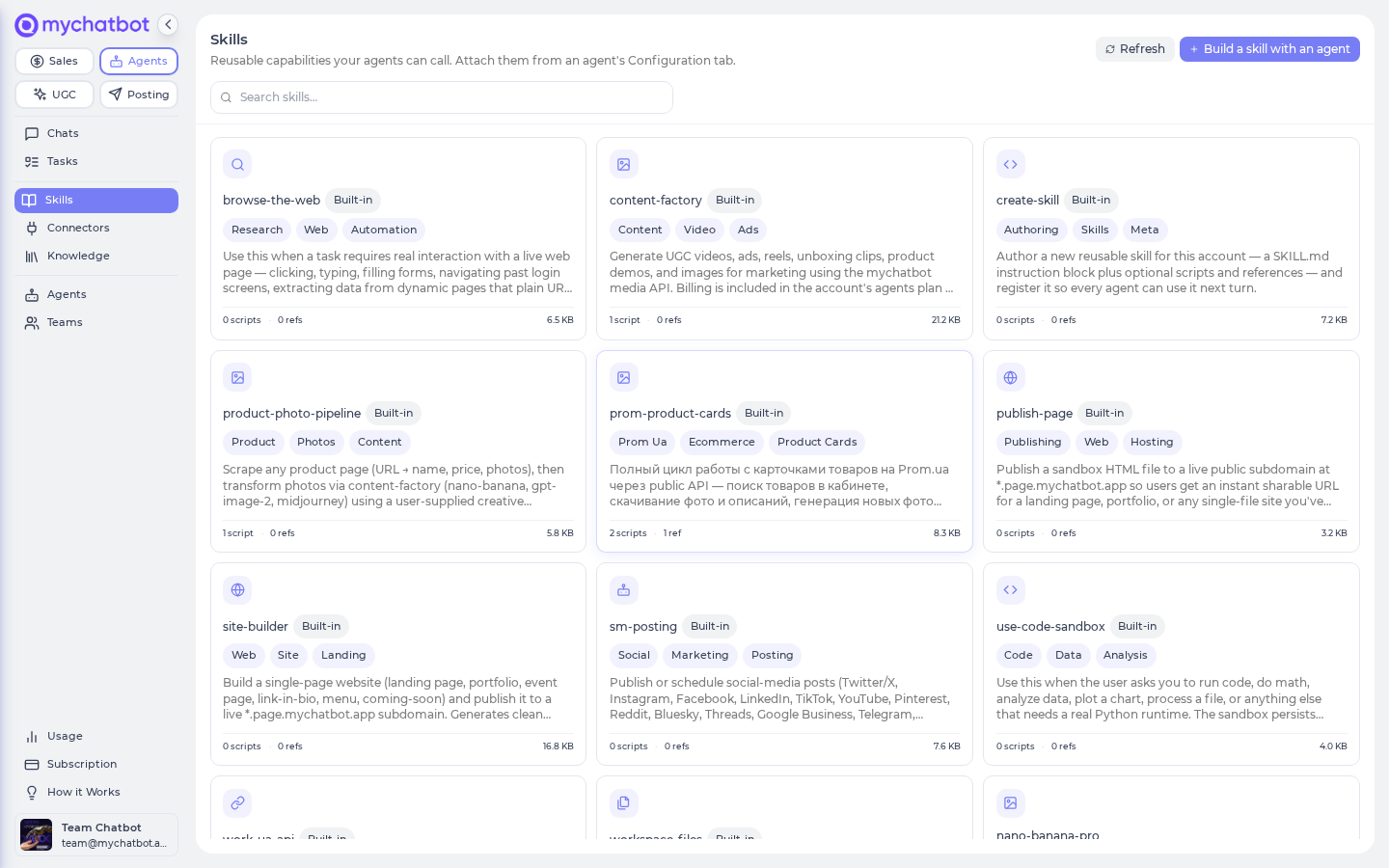
Open the Skills library at app.mychatbot.app/agents/skills — Agents left nav → Skills. Built-in skills carry a Built-in badge and are read-only; your own show Custom, with edit and delete.
Cheat sheet
Built-in vs. custom skills
| Built-in skills | Custom skills | |
|---|---|---|
| Badge in the library | Built-in | Custom |
| Who can use them | Every account | Just your account |
| Editable? | Read-only (ship with MyChatBot) | Edit & delete from the library |
| Authored by | MyChatBot | You, via the Skill Architect |
| Cap | n/a | 20 per account |
| Examples | The creative-studio media skills (photo looks, video ads, reels…), plus guides for writing new skills, opening web pages, running code in a sandbox, publishing a page, working with workspace files | Whatever you author (e.g. a "turn a job posting into an outreach brief" skill) |
Both layers show up in the same library and are available to your agents at run time. If a custom skill has the same name as a built-in one, the built-in always wins and your custom skill is ignored — so give yours unique names.
Custom skill limits
| Limit | Value |
|---|---|
| Skills per account | 20 |
| Total per skill (description + instructions + all files) | 512 KB |
| Per individual file (each script / reference) | 100 KB |
| Description length | 300 characters (it appears in the agent's context on every run, so keep it tight) |
| Instructions length | 100 KB |
| Name | 1–64 characters, lowercase letters/numbers with hyphens or underscores, starting with a letter or number |
| Labels | up to 16 |
Custom-skill scripts run in a secure sandbox, not on the agent
A custom skill can carry scripts (executable files) and references (read-only docs). Scripts don't run directly on the agent — for safety, the agent reads a script's contents, then runs it inside a secure sandbox. To make that possible, turn on the code sandbox capability for the agent (see Tools & toggles). References are documentation only and are never executed.
Authoring a skill with the Skill Architect
You don't upload a file or fill out a form — you describe the workflow in a chat and an agent writes and registers the skill for you.
In the app
On the Skills library (app.mychatbot.app/agents/skills), click Build a skill with an agent. This opens a chat with the Skill Architect (which runs on Claude Opus and has skill-authoring turned on). You can also open the Skill Architect from any existing skill's detail page via Edit in chat.
What the Skill Architect does:
- Reads the built-in guide on writing skills first, so it follows the canonical skill shape and worked examples.
- Asks 1–2 tight clarifying questions (what the skill does in one sentence; one example input + the output you want).
- Drafts the skill's instructions. If the skill needs code, it tests the script in the sandbox before committing. If the workflow touches a website, it visits the real pages and bakes in the actual steps.
- Shows you the draft and asks to register it.
- On your go-ahead, saves the skill in the same turn and confirms the name.
Kick it off
text
Use the Skill Architect. I want a reusable skill that turns a raw
Work.ua job posting URL into a structured candidate-outreach brief.
Example input: https://www.work.ua/jobs/1234567/
Output: role title, key requirements, and a 3-line opener.
Authoring is conversational, not a form
The agent serializes the description, instructions, and any files for you and saves the skill. Once saved, it appears in your Skills library and is available to every agent on the account (see Attaching below) — not just the one that authored it.
The skill detail page
Click any skill in the library to open its full page. It renders the skill's instructions as formatted text, shows any scripts and references as code blocks, and — for your own custom skills — gives you Edit in chat (reopens the Skill Architect to revise it) and Delete. Built-in skills are read-only with a Built-in badge.
Attaching skills to an agent
Skills are turned on per agent. Open the agent, go to its Configuration tab, and enable Skills ("Break instructions into loadable skill modules for the agent"). Once on, that agent can reach every skill in your library.
In the app
Agent → Configuration tab → Skills toggle.
Custom skills are account-wide — author once, use everywhere
As soon as you author a skill it becomes available to every agent on the account that has Skills enabled. You don't have to wire it into each agent individually. (There's no per-skill narrowing in the UI yet — an agent with Skills on can see the whole library.)
Why a new skill may not appear
| Symptom | Cause | Fix |
|---|---|---|
| Skill isn't available yet | A brand-new skill becomes usable on the next turn, not the turn it was created | Send another message or start a new chat |
| Skill silently ignored | Its name collides with a built-in skill | Built-in always wins — rename your skill to something unique |
| Can't save a 21st skill | Account is at the 20-skill cap | Delete an existing skill in the library, then create the new one |
| Skill nowhere to be found | It was authored on a different account | Skills are tied to the account you created them on — author it on the right account |
| An agent can't use your skills | The agent's Skills toggle is off | Turn on Skills on that agent's Configuration tab |
Promotion (custom → built-in)
There's no self-serve path to turn a proven custom skill into a built-in one. Built-in skills ship with the platform and are available to every account, always on. If you have a custom skill you'd like promoted to a built-in, contact MyChatBot support — treat it as a platform change, not a one-click action.
How agents use skills
An agent doesn't "call" a skill by name like a button. Instead it browses the short summaries of the skills available to it, then loads the full instructions of only the skill a task needs (and any reference doc or script it points to). This progressive approach keeps the agent's context lean while still giving it the detailed playbook when it matters.
Custom skills you author are treated as user-supplied content: an agent will follow them, but they can't override MyChatBot's built-in safety and outreach rules.
Best practices
Do
- Keep the description short and specific — it appears in the agent's context on every single run.
- Bake the real steps and one worked example into the instructions so the next agent can reproduce the flow without guessing.
- Use the Skill Architect to author; it reads the built-in skill-writing guide and tests scripts before saving.
- Give skills unique, descriptive names so they never collide with a built-in.
Don't
- Don't expect a custom-skill script to run directly on the agent — the agent reads it and runs it in the code sandbox instead (make sure that capability is on).
- Don't reuse a built-in skill's name to try to "shadow" it — the save is rejected.
- Don't expect a brand-new skill to be usable on the same turn it was created — check on the next turn.
- Don't hunt through each agent's settings to "expose" a custom skill — it's already available account-wide to any agent with Skills enabled.
Test it
- Click Build a skill with an agent, describe a small workflow, and confirm the Skill Architect saves it and it shows up in the Skills library.
- Open a different agent (with Skills enabled on its Configuration tab), start a new chat, and ask it to use your new skill — it should resolve, confirming the skill is account-wide.
- Try authoring a 21st skill — you should hit the 20-skill cap.
- Try naming a skill the same as a built-in — the save is rejected as a reserved name.
See also
- Creative studio: the media skills — the built-in media skills: what each makes and costs
- Build an agent
- Tools & toggles
- Models & reasoning
- Memory
- Tasks & schedules
- Knowledge bases
- Troubleshooting